HubPages Nofollow Guide HubRank Minimum

Brian E Nelson
It turns out that while I have ranked my various online properties and businesses just fine, I never bothered to rank for my NAME!
Well, good thing I know a little something about Internet publishing, SEO, and getting ranked higher by Google and other search engines. So, here comes a little linkage for indexing and SERP power. Brian Nelson personal website has an e-card, baby. You may now continue to the article you actually wanted to be reading.
HubPages Link Building Rules
Many newcomers to HubPages arrive after reading about the possibilities of both publishing writing online, and building links back to other websites or articles that they have authored.
The front page is inviting enough. It says that there are just three easy steps to building your first Hub. What could be simpler? However, there is a bit more to reaping the benefits of being published on HubPages than just clicking through 3 simple steps.
Check out some of my other tips for using HubPages effectively:
HubPage Nofollow Link Procedure
To help cut down on both blatant spammers and the number of "one and done" authors, HubPages adds a HTML tag to all outbound links created by new authors on their Hubs. The added tag is known as nofollow and it is added to the code of each link inside the <a> tags. The code is rel="nofollow", and it makes the links inserted into a Hub not count for the purposes of search engine ranking. Google, Yahoo/Microsoft, and other major search engines have all agreed to treat the nofollow tag in this manner.
New authors (like me) are often unaware of this procedure and its application to their hubs. New Hubbers who do notice the addition of nofollow tags to their links may become confused. After all, if HubPages is a good place to build backlinks, then there must be a way to link to a website without having that link nofollowed.
Fortunately, it is relatively easy to have all the links in your Hubs un-nofollowed, or more accurately, dofollow.
- Check out my Capital One Rewards Program Review.
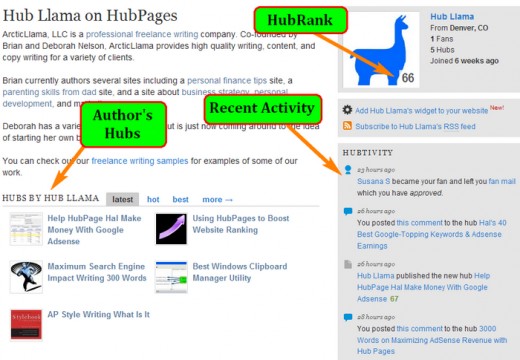
To have the HubPages nofollow tag removed from your links, two criteria must be met. First, the author's score, known as HubRank, must be above 75. Second, the individual Hub must have a HubScore over 40. (The HubPages guides say that this number is typically 50, but has been lowered to 40. No word on if the required Hub ranking will be raised back to 50 in the future.)
The author's HubPage score or HubRank is displayed in the lower-right corner of the picture uploaded to the author's HubPage profile.
Some author's become discouraged upon learning of these requirements. However, if you are truly interested in building up even a small portfolio of quality writing on HubPages, these scores will be easy to obtain.
Typically, a 500 word Hub using the standard Photo-Text-Layout garners a starting HubScore of 50. This ranking will fluctuate up and down based upon things like how much traffic it receives and the number of people who vote it up or down. If the published material is legitimate in any way, and does not have an excessive number of outgoing links, chances are its score will not drop below the 40 minimum required for having its links un-nofollwed
That leaves the HubPage author score, or HubRank as the only real issue. HubRank is based upon several factors such as number of hubs published, the traffic those hubs receive, the number of people who are your fans, and your "participation" in the HubPages community. While this sounds difficult, it too can be achieved with relatively little time and effort.
DoFollow HubPages Links
An author who writes 7 to 10 useful Hubs -- those that are not entirely self-serving or link filled -- can expect their HubRank to increase over time to somewhere close to 75 if not all the way to 75. Covering the remaining distance in HubRank is then simply a matter of making a three to five useful comments every three or four days, and becoming a fan of a handful of other Hubbers.
Update: A new metric called HubKarma also affects your HubRank now. Find out what is hubkarma and then find out how to raise hubkarma fast and easy.
Often, the comments made on another Hub will lead to another Hubber leaving a comment on one your hubs. Click on that person's link, thank them for their comment and make a nice comment on one of the hubs. Then, become that author's fan. All of these things count as "participating" and are likely enough to put the HubRank over 75. Ideally, one or more people will also become fans of yours, thereby putting the icing on the cake and keeping your score above 75 for at least long enough to determine if HubPages is something that you would like to continue persuing.
If so, then simply drop by every so often and create a few new hubs. One new hub should be sufficient if done weekly, while three or four hubs might be required if only creating new hubs each month. Either way, make sure to drop by and leave comments on your Fans hubs. This not only cements their decision to become a fan, it counts as ongoing participation in HubPages.
Follow along with these steps and you'll be writing HubPage Hubs with fully followed links in no time.
Sound advice? What are your tips for new Hubbers?
Related

Is Your Google Drop Caused by Bad Links in Your Articles?
50 Ways To Get Traffic To Your Hubpages
Hubpages Back Links How To Establish A Backlink Strategy to Increase Traffic
Make Money Writing Online with HubPages Ad Program

The Most Popular Topics on HubPages: Here's What People Follow on This Site